
The Brand Profile is where Brandforge learns your brand. It has six sections, and Brandforge uses it in every conversation, so you never have to explain your brand twice.
You can write it yourself, or upload a mood board and let Brandforge suggest a first draft. Nothing is locked or required.
Where to Find the Brand Profile
- Open Brandforge.
- Select Brand Profile above your conversations in the left navigation.
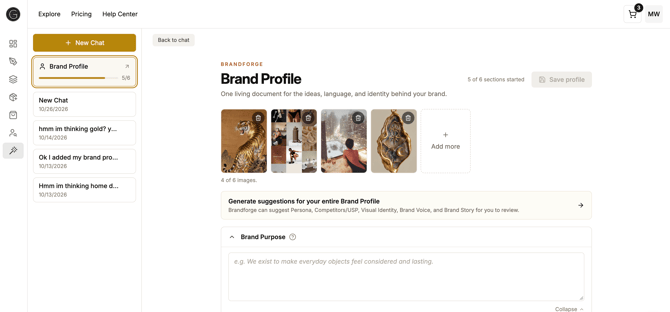
What's in the Brand Profile
- Brand Purpose: why your brand exists beyond making products.
- Brand Story: your story, in your own words.
- Persona: the people your brand is here to serve.
- Competitors / USP: your competitive edge and what makes you different.
- Visual Identity: the visual cues that make your brand recognizable.
- Brand Voice: the tone your brand uses in every conversation.
Step-by-Step: Starting from a Mood Board
- Open the Brand Profile.
- Add images that feel like your brand to the mood board strip. You can add up to six.
- Select "Generate suggestions for your entire Brand Profile."
- Review the suggestions on the next page and edit anything. If a section already has content, choose Keep current or Use new for it.
- Select Save to Brand Profile.
Ready to start?
Writing It Yourself
Open any section, type your answer, and select Save profile. Select the help icon next to a section's title to see what to write.
Saving Your Changes
Brandforge doesn't save automatically. The Save profile button turns active once you've changed something. If you leave the page with unsaved changes, you'll be asked whether to discard them.
Tips for a Better Mood Board
- Choose images that feel like your brand, not only pictures of products. Textures, colors, and places work well.
- Pick images that point in a similar direction. If they pull apart, Brandforge looks for what connects them.
- Remove an image with its trash icon, or add more later.
- Treat the suggestions as a first draft. Read and edit every one.
Limitations
- Brandforge doesn't suggest a Brand Purpose. It's about why your brand exists, and an image can't show that.
- You can add up to six images.
- Suggestions are AI-generated and can miss. Nothing is saved until you approve it.
Ready to Get Started?
Give Brandforge your brand once, and let every answer build on it.
FAQ's
Do I have to fill out every section?
No. Nothing is locked or required. Answers get more specific the more you add.
Will suggestions overwrite what I already wrote?
No. Nothing changes on your profile until you select Save to Brand Profile. If a section already has content, choose Keep current or Use new for that section. You can also edit the text before saving.
Can I generate suggestions again later?
Yes. For each section that already has content, you choose whether to keep your current text or use the new suggestion.
Can I use the Brand Profile without a mood board?
Yes. Write any section yourself, or skip the Brand Profile and ask Brandforge a question in chat.
Suggestions didn't generate.
Select Try again. If it keeps failing, contact support and tell us roughly when it happened.