
Brandforge is an AI brand strategist inside Gildform. It looks at what you've already designed and learns your brand, then helps you decide what to make next.
You can also ask it for taglines and help with your brand story. When you're ready to make something, you take the idea straight into a Gildform project.
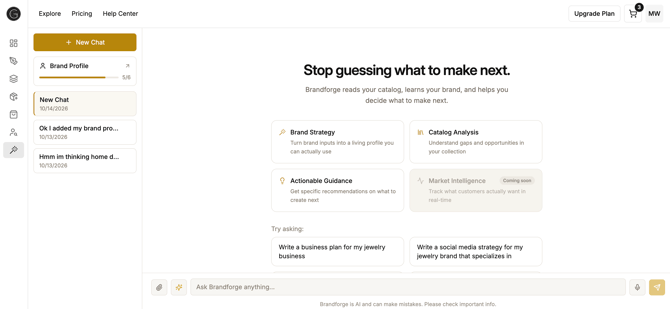
Where to Find Brandforge
Brandforge is available to all Gildform creators.
To open it:
- Log in to Gildform.
- Select Brandforge in the left navigation.
- Select New Chat, or pick up an earlier conversation from the list.
Step-by-Step: Getting a Recommendation
- Ask what to make next, or describe an idea you already have.
- Brandforge looks at your existing designs and your Brand Profile.
- Review the recommendation. It's one product, with a suggested spec (category, item type, and material) and a short design description.
- Start a project in Gildform, using Quick Start or Advanced.
- Paste the design description into the design step.
- Keep chatting to refine the idea, or ask for a tagline for your collection.
Have an idea ready?
What You Can Ask
- "What should I make next?"
- "Draft a tagline for my next collection."
- "Help me create my brand story."
- Describe your own idea and ask Brandforge to help you shape it.
You can also attach images and use the microphone to dictate your message.
Cost
- Brandforge is free to use during a limited launch period.
When to Use Brandforge
Brandforge is ideal for:
- Deciding what to make next in Jewelry, Fashion Hardware, Home Decor, or Collectibles
- Turning a rough idea into a design description you can use in Gildform
- Writing taglines and a brand story that sound like your brand
- Keeping new ideas consistent with the rest of your catalog
For help with designing and producing your product, see The Design Process in Getting Started.
Getting Better Answers
Brandforge works from what it knows about you, so the more it has, the more specific it gets.
- Fill in your Brand Profile. See How to Build Your Brand Profile.
- Share the idea behind what you want: the look, the material, the feeling.
- If an answer is too general, add detail and ask again.
- Check important details before you use them. Brandforge can make mistakes.
Limitations
- Brandforge gives one recommendation at a time, not a full collection.
- It doesn't create the project for you. You start it in Gildform.
- It only recommends products Gildform makes, and it doesn't suggest gemstones or stone setting.
- It can't tell you what's trending yet. Market Intelligence is coming soon.
- It's AI, so answers can be general or wrong.
Ready to Get Started?
Take your next idea from a question to a project.
FAQ's
How does Brandforge decide what I should make next?
It looks at what you've already designed on Gildform and at your Brand Profile, then suggests one product with a category, item type, and material. If you already have an idea, tell it, and it will help you shape it.
Will Brandforge create the project for me?
Not yet. Brandforge tells you what to make and where to start, and you create the project yourself in Gildform.
Can Brandforge tell me what's trending in my category?
Not yet. Market Intelligence is coming soon. For now, recommendations are based on your Brand Profile and your existing designs.
How do I start a new conversation, or delete an old one?
Select New Chat at the top of the left navigation. To delete a conversation, hover over it, select delete, and confirm.
The answer was generic or wrong. What can I do?
Brandforge is AI and can make mistakes, so check anything important before you use it. Answers get more specific as you fill in your Brand Profile, and you can add detail or rephrase in your next message.
Is Brandforge free?
Yes. Brandforge is free to use during a limited launch period. We'll share an update before that changes.