Gildform has a credit-based system for AI tools. You can view, purchase, and manage all your credits and billing details from your Account Settings → Billing & Transactions.
Understanding Monthly Credits
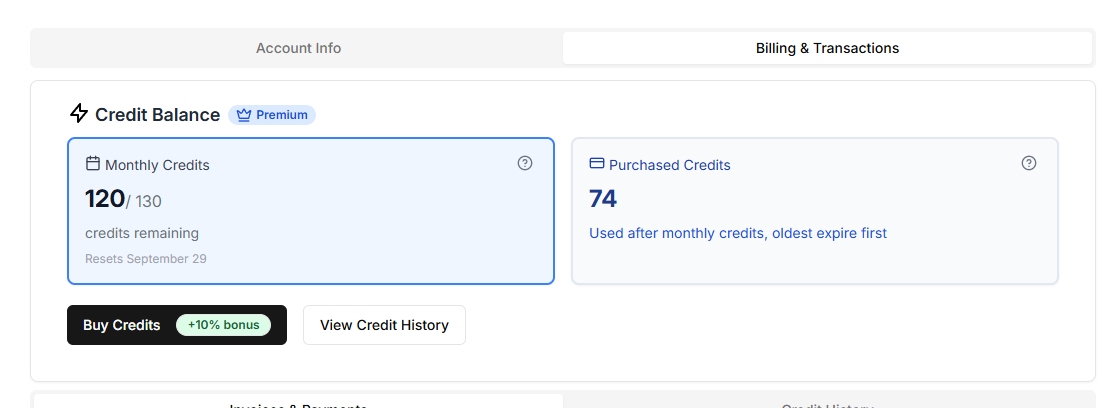
Your plan includes a set number of monthly credits that reset each billing cycle.
Unused monthly credits do not roll over.
| Plan | Monthly Credits | Included AI Tools |
|---|---|---|
| Free | 25 credits | AI Design Previews only |
| Premium | 130 credits | All AI tools + 3D previews |
| Studio | 350 credits | All AI tools + enterprise features |
Purchasing Additional Credit Packs
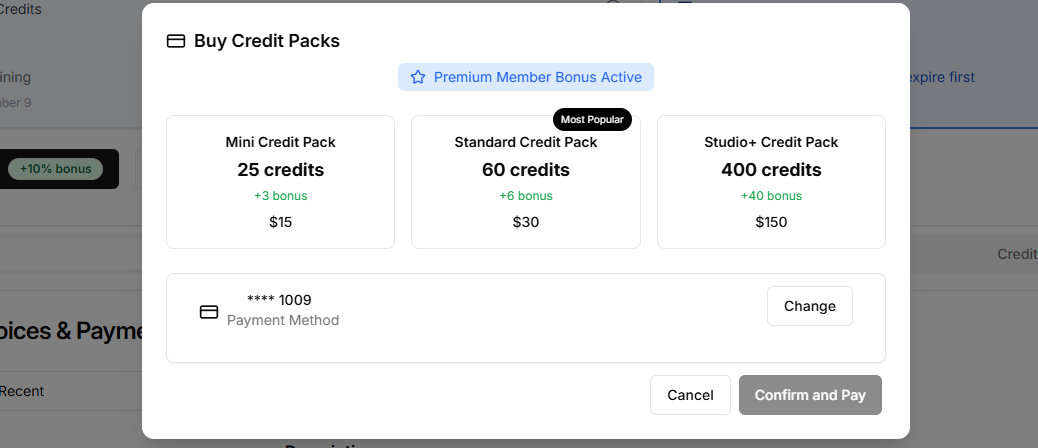
If you run out of credits, you can purchase credit packs directly from your Account Settings → Billing & Transactions:
| Pack | Credits | Price |
|---|---|---|
| Mini | 25 | $15 |
| Standard | 60 | $30 |
| Studio | 400 | $150 |
How it works:
Monthly credits are always used first.
Purchased credits are only used when your monthly credits run out.
Purchased credits roll over for 12 months from the purchase date.
Managing Billing & Invoices
Go to Account Settings to:
-
View and download invoices
-
Update payment methods
-
Check upcoming renewal dates
-
See real-time credit usage and balances
FAQs
Q: Do my monthly credits roll over?
No — unused monthly credits expire at the end of each billing cycle.
Q: Do purchased credits expire?
Yes — purchased credit packs remain valid for 12 months from the purchase date.
Q: What happens if I run out of credits mid-project?
You can purchase a credit pack instantly and continue without interruption.
Q: Will buying credits change my plan?
No, your plan stays the same. Credit packs simply add extra credits on top.